Choose your AI provider
Use compatible Umbraco.AI chat providers and approve the profiles editors can select. Choose models to suit each project's languages, budget and requirements.
Providers and profilesAI translation for Umbraco 17 and 18
Diplo Translator Omni translates pages, blocks and Dictionary items inside the Umbraco backoffice. Spend less time copying between tools and more time shaping content for each audience.
£249 per year · One production site · AI usage separate
Free evaluation: five single-page draft translation runs on one installation, with no time limit. Explore the features →
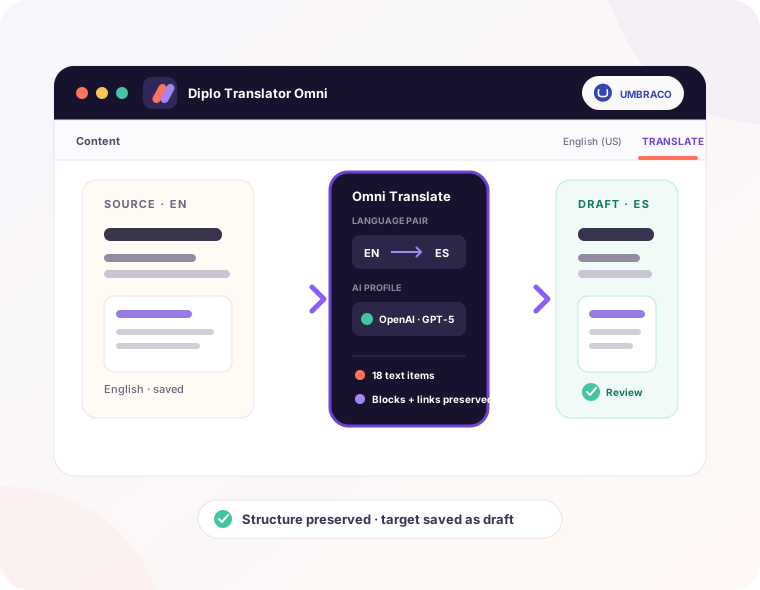
See Omni in action
Choose the content, create a translated draft and compare the result with the source page.
From source content to reviewed draft
Copying text out of blocks, pasting translations back and checking every field takes time. Omni handles the transfer in Umbraco, while your editors keep control of the result.
Start with a page or include its descendants. Preview supported content and select the properties to translate.
Your approved AI profile translates the selected text. Omni validates the structure and saves the content as a draft.
Compare language variants in the normal editor. Refine the wording and publish when your team is ready.
Keep translations current
Omni tracks what was translated and detects source text that has changed — even inside supported blocks — so you can retranslate only what changed, not the whole page.
Open the affected page with changed properties preselected. Update the text that needs attention, and review cases where a translated value has been edited independently.
Explore source changes and coverageMade for structured content
Rich text, Block List, Block Grid and nested blocks are part of everyday Umbraco work. Omni translates supported text inside them while retaining links, media references, keys and layout.
Unsupported values are skipped and reported. Selected Contentment editors are supported, and developers can extend support for custom editors through configuration or an adapter.
See real block and rich-text examplesControl beyond the translation
Use compatible Umbraco.AI chat providers and approve the profiles editors can select. Choose models to suit each project's languages, budget and requirements.
Providers and profilesPage translations are saved as drafts. Existing target values are skipped by default, and normal Umbraco content permissions still apply.
Access and permissionsFollow background jobs, review their results and see who requested each translation. Use coverage reports and glossary rules to keep multilingual content organised and consistent.
Translation Jobs and historyWatch Omni in action
Follow Omni through the Umbraco backoffice, from translating a single page and whole content sections to Dictionary items and ongoing language management.
See how the different parts of the product work together in one practical tour, then explore focused demonstrations of individual features and multilingual workflows.
View all videos
Created and supported by Dan Booth
Dan is an Umbraco MVP and the developer behind Diplo God Mode and Diplo Audit Log Viewer. Omni brings that practical backoffice experience to multilingual publishing.
For your next multilingual project
Start with the requirements and supported editors, then review the licence for your site. For agency or multi-site use, contact Dan about your setup.
Read the setup guideSingle Site Licence
£249 / year
One production Umbraco site.
AI provider usage is billed separately.